 Lullog
The baby feeding log built for the 3 AM feed
Log from the lock screen, by voice, or in two taps, without opening the app. Your partner, a grandparent or a sitter opens one link in any browser and logs alongside you.

Free to log · iPhone · iOS 17 or later
- Works offline
- No ads
- No account
- Log without opening the app
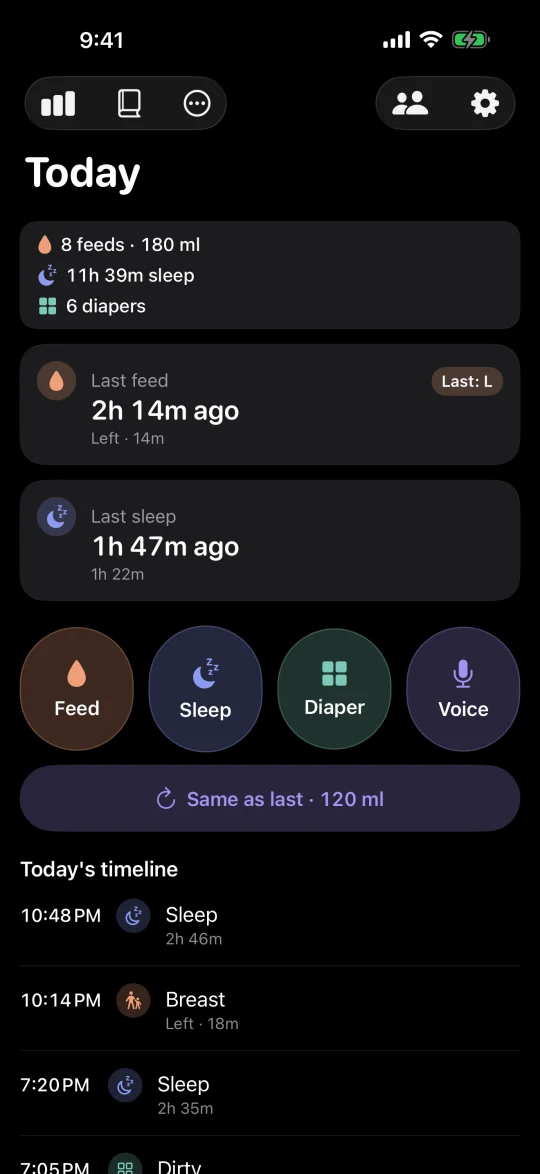
Without opening the app
Log without opening the app
Interactive widgets on the lock screen and home screen have one-tap buttons: start a feed timer, log a bottle like last time, log a diaper, start a sleep timer.
Say "Log a bottle in Lullog" to Siri, or put the shortcut on the Action Button. On iOS 18 you can add Lullog buttons to Control Center.
These buttons, Siri and voice logging are free in the latest version of Lullog. Widgets and the Live Activity also count up from the last feed and the last sleep. Lullog shows the time that has passed; it does not predict the next feed.
Voice
Say it instead of typing it
Tap the mic and say "bottle 120" or "wet diaper". Lullog saves the entry and shows an Undo button.
Speech is recognised on your iPhone only and the recording never leaves the phone. Only if you turn on cloud writing help for Say it in one go is the recognised sentence sent, as text (see the privacy policy). Voice works in English, Korean, Japanese, Chinese, Spanish, German, French, Portuguese and Italian. Where on-device recognition is not available, the mic button is hidden.
Logging
Two taps, even if you forgot to log it
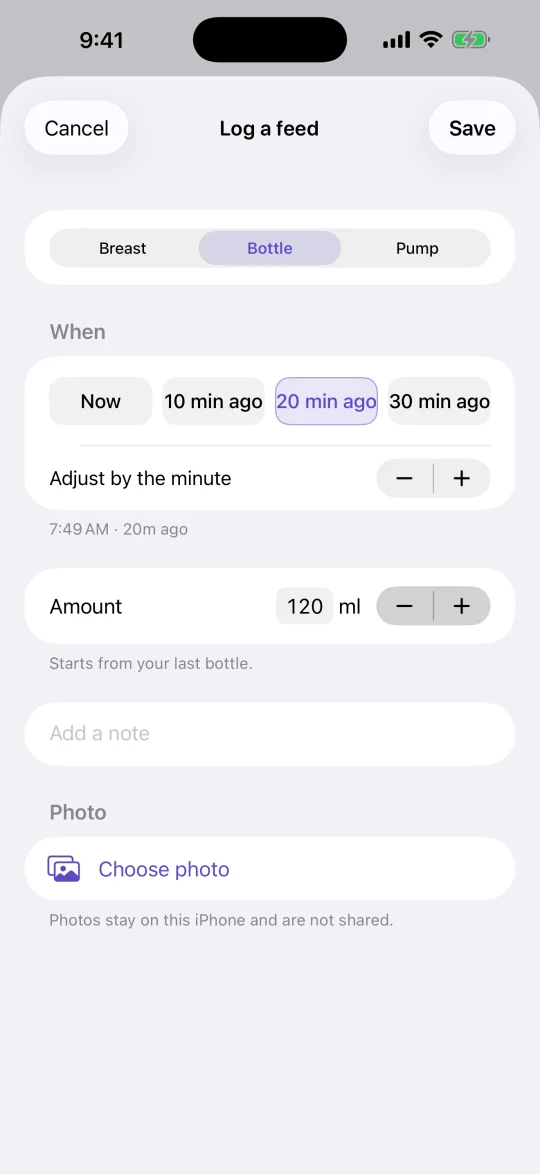
Tap Feed, choose breast, bottle or pump, and save. Fell asleep before you logged it? Pick "10 min ago", "20 min ago" or "30 min ago" instead of scrolling a time wheel.
Same bottle again? "Same as last · 120 ml" on the Today screen logs it in one tap.
You can add a photo to a feed or diaper entry. Photos stay on this iPhone and are never synced or shared. For five seconds after any save, an Undo button takes it back. Swipe an entry to delete it, with Undo, or tap it to edit. If an entry can’t be saved, the form stays open with what you entered and offers Try again.
After your first few days of logging, Today offers a short summary of how they went. It is free.
Optional reminders: a next-feed reminder at the interval you choose, with quiet hours, and a check when a sleep timer has been running a long time. They are local notifications set on your iPhone, and they are off until you turn them on.
Lock screen
Stop the timer without unlocking your phone
When a sleep or breast-feed timer is running, it shows in the Live Activity on the lock screen with a Stop button. Tap Stop and the entry is saved, without Face ID or a passcode and without putting the baby down.
The lock screen timer is free, like all logging.
Sharing
One link for everyone who helps
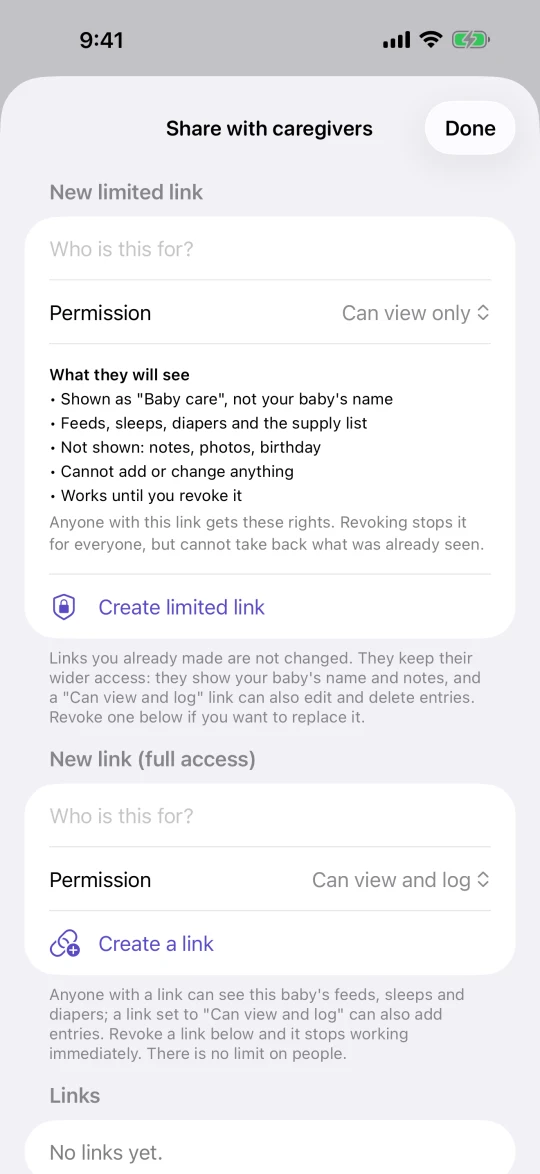
Send a link to your partner, a grandparent or a sitter. They open it in any browser to see the log and, if you allow it, add entries. No app, no account, no fee per person.
Each person gets their own link, set to view and log or view only. Revoke a link any time and it stops working.
New in version 1.3.2: limited links. A new limited link starts as view only; you choose if it may also add entries. When you allow recording, a limited link can add entries but cannot edit or delete them. Names and notes stay private on limited links. Links you made before keep working as they did; nothing is changed or converted for you.
The shared web page shows when it last updated and helps you confirm an entry if the connection drops.
Sharing is off until you tap Connect to sync. Until then your log stays on your iPhone and is not synced anywhere; Lullog only sends a few anonymous usage counts, which you can turn off in Settings, and text for writing help if you turn it on.
Diary
Your log, day by day
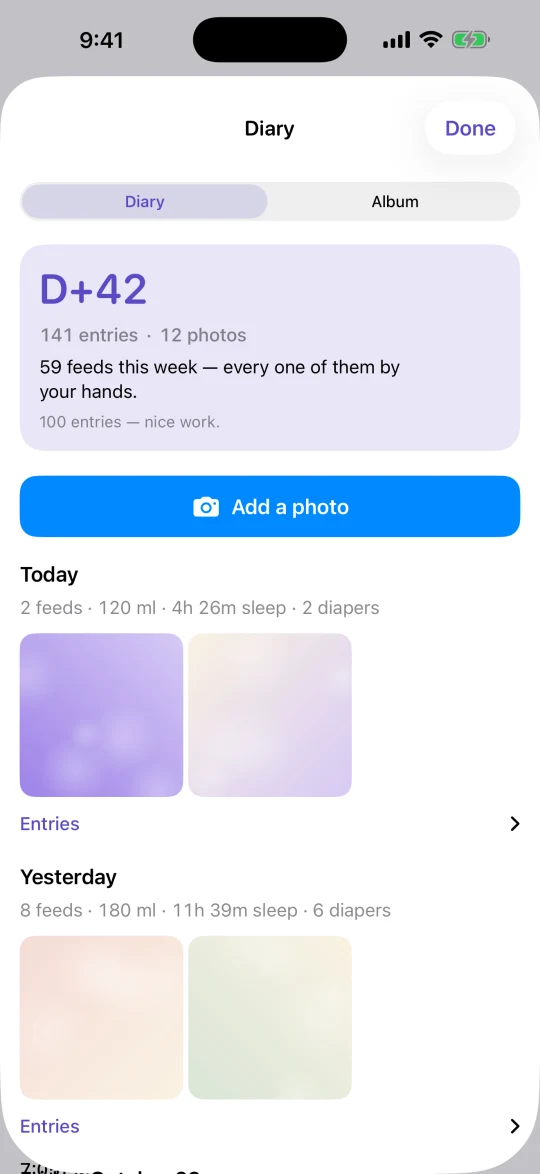
The Diary shows each day's totals with the photos you added, under a D+N count of days since birth and the number of entries and photos so far.
There are no streaks and nothing to keep up. The Diary is free.
Lullog Lifetime
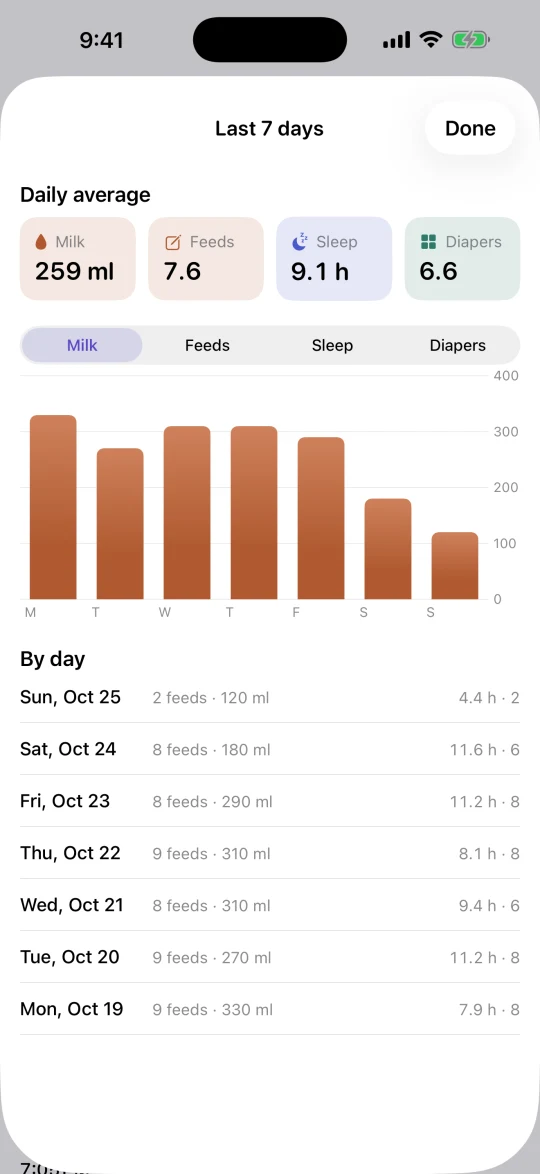
The last 7 days on one screen
Daily averages for feed amount, number of feeds, sleep hours and diapers, with a bar chart and a day-by-day list.
The 7-day summary, daily charts and CSV export are part of Lullog Lifetime, a one-time purchase. Lullog Plus includes them too.
Lullog Plus
For the whole team
Night feeds, diaper runs and checkups are shared work. The basics are for everyone: Who logged what and the shared supply list come with Lullog, no purchase needed. Lullog Plus adds more for the whole team. You find all of it under More on the Today screen.
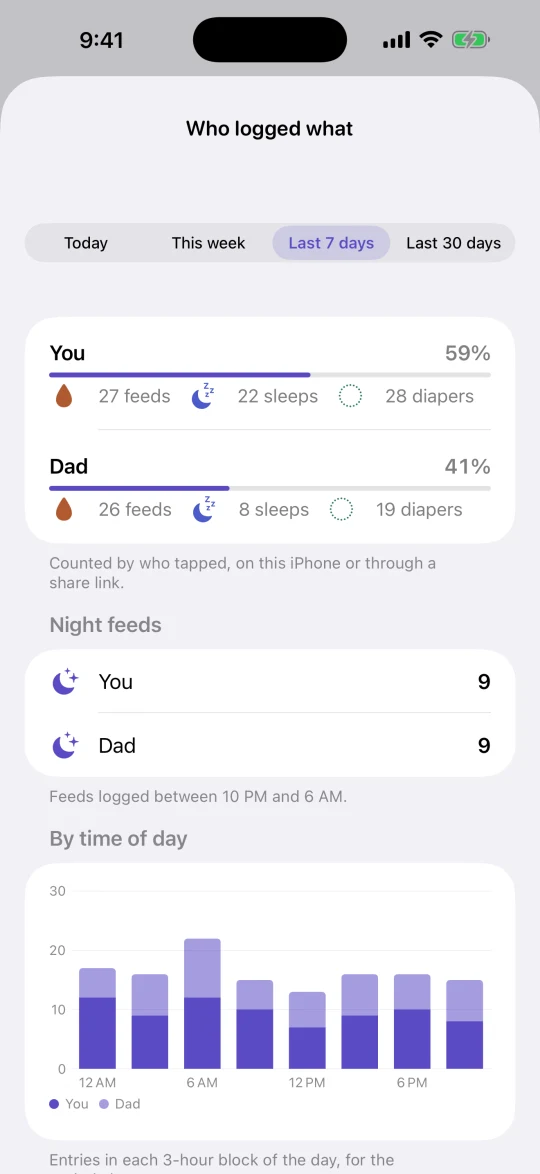
- Who logged what · includedToday, this week or the last 7 days, per caregiver, including night feeds. With Plus: 30-day trends and a time-of-day view per caregiver.
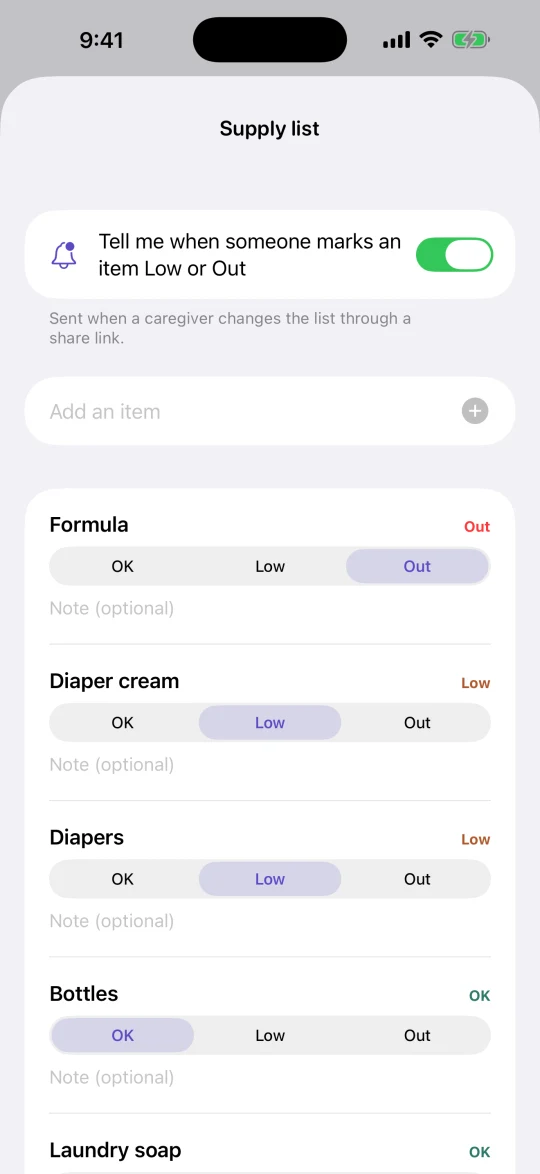
- Shared supply list · includedDiapers, wipes, formula and more, marked OK, Low or Out. With sharing on, everyone with a link sees it, on the web share page too.
- Supply alerts · PlusA notification when someone with a link marks a supply Low or Out. It arrives when Lullog syncs, so when the app is opened or open.
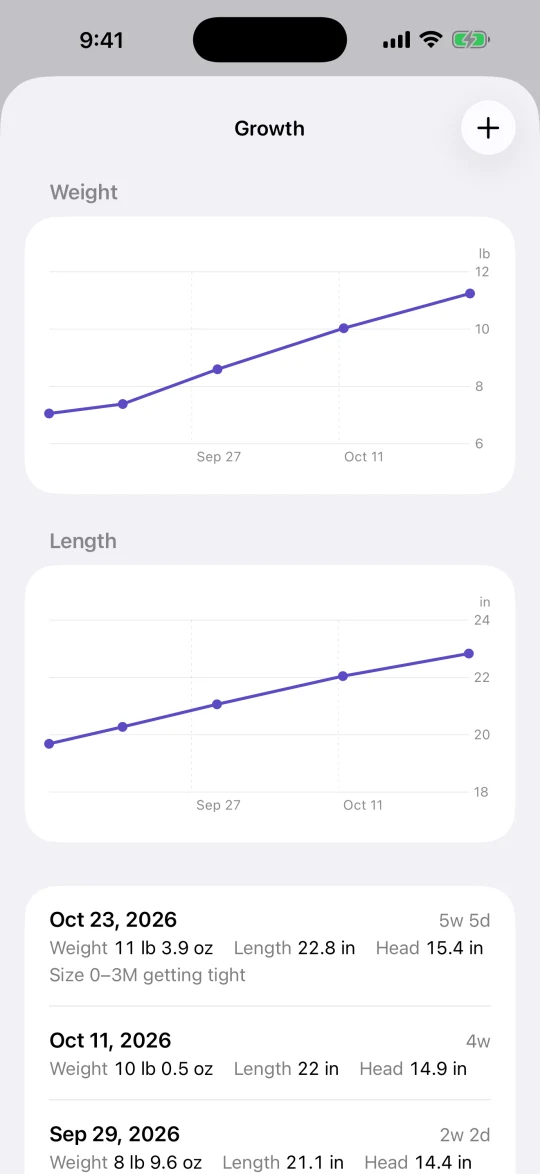
- Growth log · PlusWeight, length and head circumference with a note, on simple charts. Lullog shows your numbers and does not interpret them.
- PDF report for the doctor · PlusThe last 7 or 30 days of the log in one PDF to bring to a checkup.
- Album tags and ZIP backup · PlusTag photos as Daily, Growth, Documents or Milestone, and save your log and photos as one ZIP file.
- 24-hour pattern · PlusThe last 14 days on one 24-hour grid, so you can see when feeds and sleep happened.
- App icons · PlusThree alternative app icons: Night, Apricot and Sage.
Lullog Plus is a one-time purchase that includes everything in Lullog Lifetime. Who logged what and the supply list stay free without it. Growth entries and photos stay on your iPhone. Reports and backups are made on the phone and leave it only when you share them yourself.
Want to try it first? Tap Try Plus for 7 days on the purchase screen to use every Plus feature for 7 days at no charge. It is not a subscription and nothing renews; afterwards Plus features lock again and your log stays.
Pricing
Pay once. No subscription.
Everything you need to log and share is free, with no ads and no limit on caregivers. Two optional one-time purchases add more: Lullog Lifetime for the weekly view, and Lullog Plus for the whole team.
Free
Free
- Feed, sleep and diaper logging
- Today screen and timeline
- Home screen widgets
- Lock screen Live Activity
- Lock screen timer with Stop
- Widgets, Siri and Control Center logging
- Voice logging (on-device)
- Photos and Diary
- Link sharing with unlimited caregivers
- Limited links: view only by default, or add entries without editing or deleting
- Who logged what: today, this week, last 7 days, per caregiver, with night feeds
- Shared supply list (OK, Low, Out)
- Optional next-feed reminders with quiet hours
- Swipe to delete with Undo, tap to edit
- No ads
Lullog Lifetime
$9.99 one-time purchase · no subscription
- Everything in Free
- 7-day summary
- Daily charts
- CSV export
Everything included
Lullog Plus
$12.99 one-time purchase · no subscription
- Everything in Lullog Lifetime
- 30-day team trends and time-of-day view per caregiver
- Supply alerts when someone marks Low or Out
- Three app icons: Night, Apricot, Sage
- Growth log with simple charts
- PDF report for the doctor (last 7 or 30 days)
- Album tags and ZIP backup
- 24-hour pattern of the last 14 days
Both are one-time purchases. Lifetime owners can upgrade to Plus.
For the first 7 days after you first open Lullog, both are available at a lower introductory price. Prices are US App Store prices and may differ by country.
Free web tools
These open in any browser and need no app or account.
- Baby tracker pricing: subscription or one-time purchase
How the common pricing models differ and what to check before you pay.
- Newborn feeding and sleep guides (Korean)
Feeding intervals, amounts by month, sleep windows and diaper counts.
- Feeding interval calculator (Korean)
Estimate daily amount and spacing from your baby's weight and age.
Get Lullog for iPhone
Free to download and log. Pay once only if you want the weekly view or the Plus tools.
Lullog is a log, not medical advice. If you are worried about feeding or sleep, talk to your pediatrician.